Apple introduced corner smoothing in iOS 7 and designers have been chasing it ever since. Most people assume the shape is a superellipse — it’s not.1 CSS is getting a native superellipse() function for corner-shape, which is exciting, but it won’t match what Apple and Figma actually render. There are three problems.
Superellipse won’t cut it
It’s a different curve. A superellipse is a close approximation, but the curvature profile doesn’t match iOS corners. The differences show up in exactly the places that matter most — the transitions between the straight edges and the rounded corners.
Borders thicken at the apex. Because the inner and outer superellipses aren’t truly parallel, the border visibly thickens at the diagonal of each corner. This gets worse at higher exponents — superellipse(2), the default squircle value for corner-shape, is worse than superellipse(1.5).
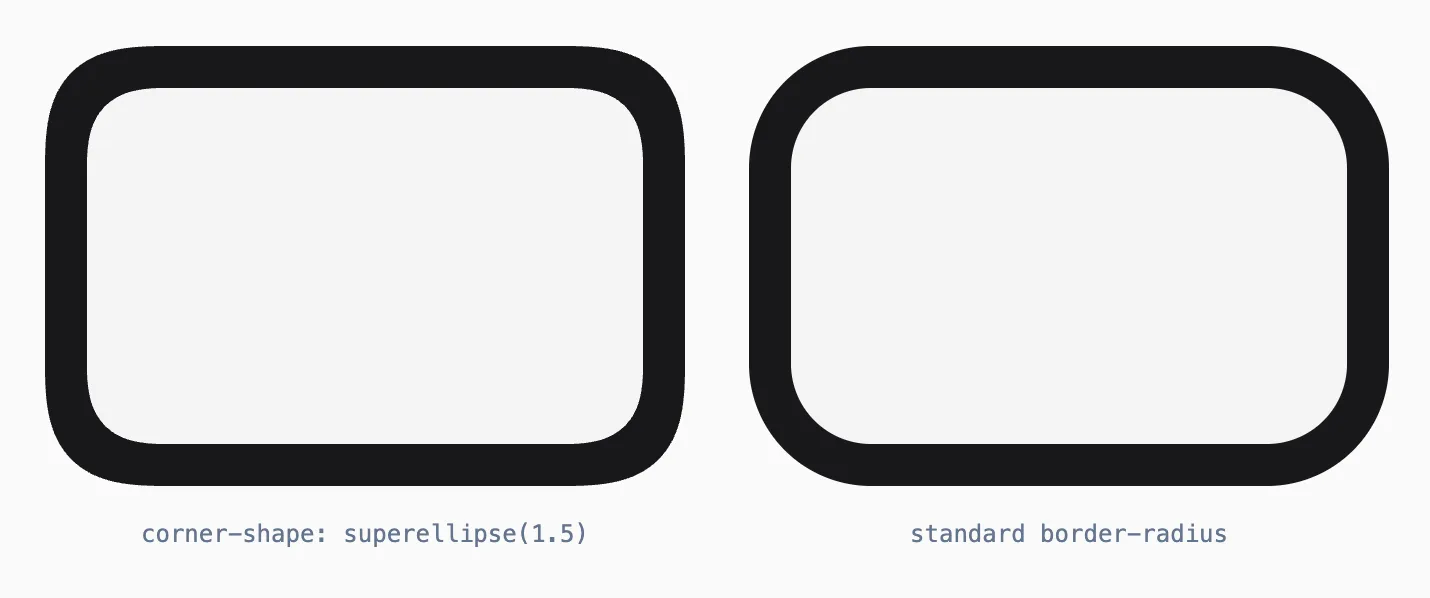
Notice: the superellipse produces less rounding for the same corner-radius value, and the border visibly thickens at the diagonal apex of each corner.
It’s not performance-free. corner-shape: superellipse() still needs to compute a non-trivial mathematical function per corner, per element, per frame during dimension-changing animations. It’s not as expensive as shape() with trig functions (more on that later), but it’s not border-radius either. The browser can’t just composite a static mask — it has to re-evaluate the curve.
The math: Bézier arcs
What Apple and Figma actually use is a construction based on cubic Bézier curves spliced to circular arcs. Daniel Furse’s 2018 Figma blog post2 traces the full journey — from superellipses to clothoid spirals to the final practical solution.
The idea: instead of replacing the entire rounded corner with a mathematical curve, you keep a circular arc at the center and add Bézier curves on both sides that smoothly transition from zero curvature (the straight edge) to the arc’s curvature. A smoothing factor s (0–1) controls how much of the straight edge is consumed by this transition. At s = 0, you get a standard border-radius. At s = 0.6 (the iOS default), you get that characteristic continuous curvature.
The key parameters from the Figma construction:
p = (1 + s) × r— total space consumed by one corner along the edgearcMeasure = 90° × (1 - s)— the remaining circular arc- Four control-point distances (
a,b,c,d) derived from half-angle identities
The entire thing computes to about 8 trig calls per corner. Cached by dimension, it runs once per unique size and never again.
Borders
Every squircle library I found computes the border path by shrinking the radius and generating a smaller squircle. This is wrong — a smaller squircle isn’t a parallel offset of the larger one, it’s a proportionally scaled copy. The true parallel curve of a Bézier is a degree-10 algebraic monster.
I found Tiller and Hanson’s 1984 paper3 — Offsets of Two-Dimensional Profiles — which describes a control-polygon offsetting technique for Bézier curves. For squircle geometry specifically, the correction collapses to E = borderWidth × tan(β/2) where β = 45° × smoothing.
That solved uniform thickness, but introduced a curvature kink at the Bézier-arc junction. I discovered the fix by accident — nesting two SmoothedViews, where the inner one at radius - borderWidth with the same formula looked perfectly smooth because it’s a natural squircle, not a corrected one. So I use a natural inner squircle. The border is slightly thicker at the diagonal (~s × borderWidth), but the curvature is continuous everywhere. At typical border widths, the variation is sub-pixel.
The capsule problem
A capsule (stadium shape) seems like it should be a special case of corner smoothing where radius = height / 2. It’s not — at least not without modification.
When the corner radius equals half the short side, two adjacent smoothing transitions share the same edge and collide. The standard Bézier-arc construction produces a visible cusp at the apex where the two corners meet. The shape looks pinched at the ends.
The fix: replace the two separate short-side transitions with a single cubic Bézier that spans from one arc endpoint to the other. This cap Bézier is tangent-continuous with both arcs and passes through the bounding-box edge at the apex. The control-point distance is t = (4r × tan(β/2)) / 3, decomposed into axis components via sin(β) and cos(β).
The result is a capsule that smoothly transitions from a standard stadium shape (s = 0) to a fully smoothed lozenge (s = 1), without the cusp artifact. It’s a different construction from SmoothedView — not a special case of it, but a sibling that shares the same smoothing parameter.
Worth noting: CSS corner-shape: superellipse() can’t help here at all. When border-radius is 50% (a capsule), the superellipse exponent has nothing to work with — the corners already consume the entire short side, so there’s no straight-to-curve transition left to smooth. You get the same stadium shape regardless of the exponent. A smooth capsule requires a fundamentally different path construction.
SmoothedView and SmoothedCapsule
Both components use the same architecture: a singleton ResizeObserver shared across all instances, an LRU path cache keyed by dimensions, and a clip-path: path('...') that the browser composites like any static mask. Borders are rendered via a ::after pseudo-element with an evenodd clip path (outer path + inset inner path).
Zero dependencies. The Bézier math is inlined — it’s about 60 lines of geometry that replaces what was previously an npm import.
Try SmoothedView — drag the smoothing slider from 0 to 1 and watch the difference against plain border-radius:
I’ll write a dedicated post on the component internals, the observer pattern, and how to use them outside React. For now, both are available as shadcn registry items — zero dependencies, drop into any React project:
pnpm dlx shadcn@latest add https://kit.roomzer.dev/r/smoothed-view.jsonpnpm dlx shadcn@latest add https://kit.roomzer.dev/r/smoothed-capsule.jsonWhy not CSS shape()?
CSS shape()4 shipped across browsers in early 2026 and can express the full squircle formula using calc() with sin(), cos(), tan(). I built an implementation — it worked well for static elements.
Then I benchmarked it properly.
| Test | CSS shape() | SVG clip-path | Ratio |
|---|---|---|---|
| Baseline 15el | 56.8 fps / 14% drop | 115.4 fps / 0% drop | 2× |
| Baseline 50el | 14.8 fps / 26% drop | 105.8 fps / 2% drop | 7× |
| Real-world 30el | 25.8 fps / 20% drop | 79.0 fps / 1% drop | 3× |
| Layout 30el | 55.8 fps / 10% drop | 92.7 fps / 5% drop | 1.7× |
| Morph 30el | 19.5 fps / 53% drop | 58.7 fps / 17% drop | 3× |
| Stress 50el | 7.2 fps / 97% drop | 27.8 fps / 35% drop | 3.9× |
clip-path: path('M 25.3 64.7 ...') is a static string — the browser composites it like a border-radius, basically free. clip-path: shape(from 0 var(--p), curve to ...) is a live expression. During dimension-changing animations, 100% changes every frame, invalidating every calc(), re-evaluating every trig function. Per element. Per frame. On the main thread.
The SVG approach computes the path once, caches it, and hands the compositor a static string. Under stress, the CSS version drops 97% of frames.5
What’s next
Both components are shipping in my projects and available via the registry. The companion post — SmoothedView & SmoothedCapsule — covers the component APIs, showcases, and how to use them with motion/react and Vaul.
Footnotes
-
Early reverse-engineering by Marc Edwards6 in 2013 suggested
n ≈ 5. Follow-up work by Mike Swanson7 (using genetic algorithms!) and Manfred Schwind8 (who looked directly at the iOS code) showed it was a Bézier construction. The superellipse is close but systematically wrong. ↩ -
Daniel Furse — Desperately Seeking Squircles, Figma, 2018. Traces the full journey from superellipses to clothoid spirals to the final Bézier-arc construction used by Figma. ↩
-
Wayne Tiller & Eric Hanson — Offsets of Two-Dimensional Profiles, IEEE Computer Graphics and Applications, vol. 4, no. 9, pp. 36–46, 1984. Control-polygon offsetting technique for computing approximate parallel Bézier curves. ↩
-
CSS Values and Units Module Level 4 —
shape(), W3C. The CSS function that enables trig-based squircle clip paths natively. ↩ -
shape()is still great for static shapes or shapes that only change when explicit custom properties change. The problem is specifically: many elements × dimension-changing animations × trig-heavy expressions. That combination makes the CSS engine the bottleneck. ↩ -
Marc Edwards — The hunt for the squircle, Apply Pixels, 2017. Reverse-engineered the iOS icon shape and suggested
n ≈ 5. ↩ -
Mike Swanson — Unleashing genetic algorithms on the iOS 7 icon, 2013. Used genetic algorithms to fit a superellipse exponent to iOS 7 icons. ↩
-
Manfred Schwind confirmed it was a Bézier construction by examining iOS code directly. His findings are documented in the Figma blog post below. ↩